Palettes & Color Themes
Extraction of Color Palettes and Themes
5.6M Downloads / Month
Open Source MIT License
5.6M Downloads / Month
Open Source MIT License
Extract color palettes with Intervention Image.
public ColorExtractor::dominant(int $limit = 8, ?SizeInterface $region = null): PaletteInterface
Extract the most visually prominent colors from an image. This method analyzes the image using a K-Means algorithm and returns the colors that stand out most, regardless of how frequently they appear.
Please note that the limit is the maximum number of colors the palette may contain. The result can contain fewer colors than the specified limit.
| Name | Type | Description |
|---|---|---|
| limit | int | The maximum number of colors in the extracted palette (Default: 8) |
| region | null or SizeInterface | Limit the color extraction to a region of the image. By default, the entire image. |
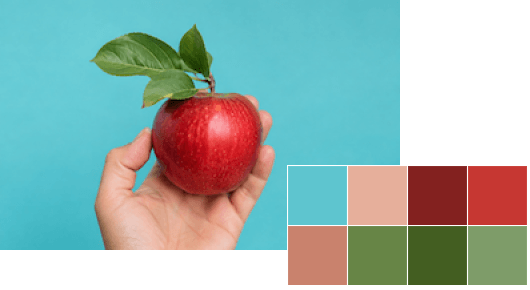
use Intervention\Image\ImageManager;
use Intervention\Image\Drivers\Gd\Driver;

// read an image
$image = ImageManager::usingDriver(Driver::class)->decode('example.jpg');

// extract the 5 most dominant colors from the image
$palette = $image->colors()->dominant(5);
public ColorExtractor::popular(int $limit = 256, ?SizeInterface $region = null): PaletteInterface
Extract the most frequently used colors from an image. Unlike dominant colors, this method returns colors based on how often they appear in the image pixels. Furthermore, this method uses quantization for images with a large number of colors in order to reduce the colors in a meaningful way. This helps improve performance and prevents the palette from containing too many similar colors.
Please note that the limit is the maximum number of colors the extraction may contain. The result can contain fewer colors than the specified limit.
| Name | Type | Description |
|---|---|---|
| limit | int | The maximum number of colors in the extracted palette (Default: 256) |
| region | null or SizeInterface | Limit the color extraction to a region of the image. By default, the entire image. |
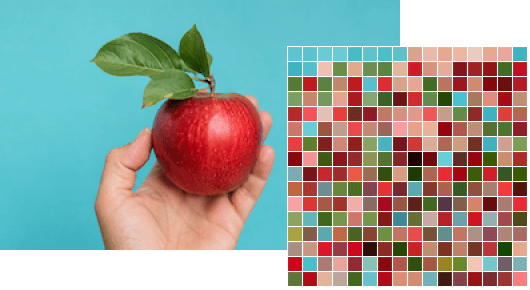
use Intervention\Image\ImageManager;
use Intervention\Image\Drivers\Gd\Driver;

// read an image
$image = ImageManager::usingDriver(Driver::class)->decode('example.jpg');

// extract the 32 most used colors from the image
$palette = $image->colors()->popular(32);
public ColorExtractor::theme(Theme|ThemeDefinitionInterface $theme = Theme::VIBRANT_MUTED): ThemeInterface
Extract a color theme from an image. The result provides semantically meaningful colors of the given theme. The default theme provides colors for vibrant, muted, dark, and light variations. If no colors could be found for a theme category in the image, the color swatch property may be null.
| Name | Type | Description |
|---|---|---|
| theme | Theme or ThemeDefinitionInterface | The color theme to extract from the image. |
Intervention\Image\Colors\Themes\VibrantMuted\Theme::$vibrant: ?ColorInterfaceIntervention\Image\Colors\Themes\VibrantMuted\Theme::$muted: ?ColorInterfaceIntervention\Image\Colors\Themes\VibrantMuted\Theme::$darkVibrant: ?ColorInterfaceIntervention\Image\Colors\Themes\VibrantMuted\Theme::$darkMuted: ?ColorInterfaceIntervention\Image\Colors\Themes\VibrantMuted\Theme::$lightVibrant: ?ColorInterfaceIntervention\Image\Colors\Themes\VibrantMuted\Theme::$lightMuted: ?ColorInterfaceIt is possible to create own color theme definitions implementing Intervention\Image\Interfaces\ThemeDefinitionInterface and passing the implementation as an argument.
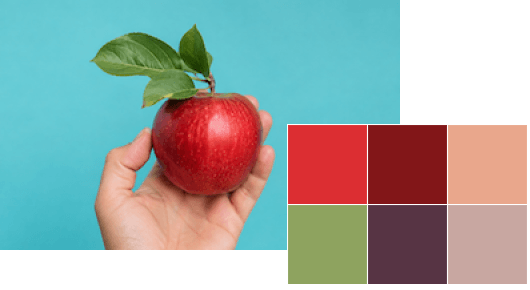
use Intervention\Image\ImageManager;
use Intervention\Image\Drivers\Gd\Driver;

// read an image
$image = ImageManager::usingDriver(Driver::class)->decode('example.jpg');

// extract color theme from the image
$theme = $image->colors()->theme();

// access individual swatches
$color = $theme->vibrant;  // ColorInterface or null
$color = $theme->muted;  // ColorInterface or null
$color = $theme->darkVibrant;  // ColorInterface or null
$color = $theme->darkMuted;  // ColorInterface or null
$color = $theme->lightVibrant;  // ColorInterface or null
$color = $theme->lightMuted;  // ColorInterface or null

// themes can be transformed into a palette to access all of its methods like sorting
$palette = $theme->toPalette();
Once you have extracted a color palette, you can access individual colors using array notation, helper methods, or by iterating through all colors in the palette.
// extract dominant colors from image
$palette = $image->colors()->dominant();

// access first color (most dominant in this case)
$color = $palette->first();

// access last color (least dominant in this case)
$color = $palette->last();

// palette implement array access
$color = $palette[0];
$color = $palette[1];
$color = $palette[2];

// access colors in iteration
foreach ($palette as $color) {
    $color->toHex();
}
public PaletteInterface::hasColor(ColorInterface $color): bool
Check whether the given color is in the palette.
| Name | Type | Description |
|---|---|---|
| color | string or ColorInterface | The color to be checked. |
// extract some colors from image
$palette = $image->colors()->popular()

// check if white is part of the result
$palette->hasColor(Color::rgb(255, 255, 255))

// method also accepts strings
$palette->hasColor('ffffff')

// method also accepts NamedColor::class
$palette->hasColor(NamedColor::WHITE)
public PaletteInterface::sortByChannel(string|ColorChannelInterface $channel): PaletteInterface
Sort colors in a palette by a specific color channel value. This allows you to arrange colors by properties like hue, saturation, lightness, or any other channel in ascending or descending order.
| Name | Type | Description |
|---|---|---|
| channel | string or ColorChannelInterface | The color channel whose values are used to sort the colors in the palette. |
use Intervention\Image\Colors\Hsl\Channels\Saturation;

// extract some popular colors from image and sort them by saturation
$palette = $image->colors()->popular(64)->sortByChannel(Saturation::class);

// sort in reverse order
$palette = $image->colors()->popular(64)->sortByChannelDesc(Saturation::class);
public PaletteInterface::count(): int
Get the total number of colors in a palette. This is useful when you need to know how many colors were extracted or remain after filtering operations.
// count colors in extracted palette
$count = $image->colors()->popular()->count();
public PaletteInterface::filter(callable $callback): PaletteInterface
Run callback on each color in the palette and keep only the ones that return true.
// filter only grayscale colors
$filtered = $image->colors()->popular()->filter(function (ColorInterface $color): bool {
    return $color->isGrayscale();
});
public PaletteInterface::map(callable $callback): PaletteInterface
Run a callback on each color in the palette and replace it with the result.
// map colors to semi-transparent variants
$filtered = $image->colors()->popular()->map(function (ColorInterface $color): ColorInterface {
    return $color->withTransparency(.5);
});
public PaletteInterface::slice(int $offset = 0, ?int $length = null): PaletteInterface
Extract a subset of colors from a palette. This method works like PHP's array_slice function, allowing you to take a specific range of colors from the palette.
// extract some popular colors from image
$palette = $image->colors()->popular();

// take only the first 3 colors
$sliced = $image->colors()->slice(0, 3);
public PaletteInterface::toColorspace(string|ColorspaceInterface $colorspace): PaletteInterface
Convert all colors in a palette to a different color space. This is helpful when you need to work with colors in formats like CMYK, HSL, or other color models.
| Name | Type | Description |
|---|---|---|
| colorspace | string or ColorspaceInterface | The color space into which all colors in the palette are converted. |
use Intervention\Image\Colors\Cmyk\Colorspace as Cmyk;

// extract dominant colors from an rgb image
$rgbPalette = $image->colors()->dominant(3);

// convert colors in palette to cmyk
$cmykPalette = $palette->toColorspace(Cmyk::class);
public PaletteInterface::quantizer(int $levels): PaletteInterface
Combine similar colors in the palette to their quantized version according to the given level of quantization.
| Name | Type | Description |
|---|---|---|
| levels | int | Quantization levels ranging from 256 (for the highest level of detail) to 1 (lowest level). |
// extract popular colors from image
$palette = $image->colors()->popular();

// quantize palette to a lower detail level
$quantizedPalette = $palette->quantize(4);
public PaletteInterface::reduce(int $levels): PaletteInterface
Reduce similar colors in the palette by quantization with the given levels of detail but keep original first color values.
| Name | Type | Description |
|---|---|---|
| levels | int | Quantization levels ranging from 256 (for the highest level of detail) to 1 (lowest level). |
// extract popular colors from image
$palette = $image->colors()->popular();

// quantize palette to a lower detail level but keep original color values
$reducedPalette = $palette->reduce(4);